The 9 Best Network Cable Testers
Updated by · How we research

Ethernet testers, toners and a live-port checker compared on split pairs, length, PoE and phone or coax support. The Klein Scout Pro 3 leads nine picks. When users buy our independently chosen editorial picks, we may earn commissions to help fund the Wiki.
A tester that lights up green proves each wire lands on the right pin, but it can't promise gigabit speed. Only a qualifier or a certifier can. Split pairs are the classic trap: they pass a simple light test and still slow a link. This list is for homeowners, installers and IT staff who build, fix or trace cables.


From the manual
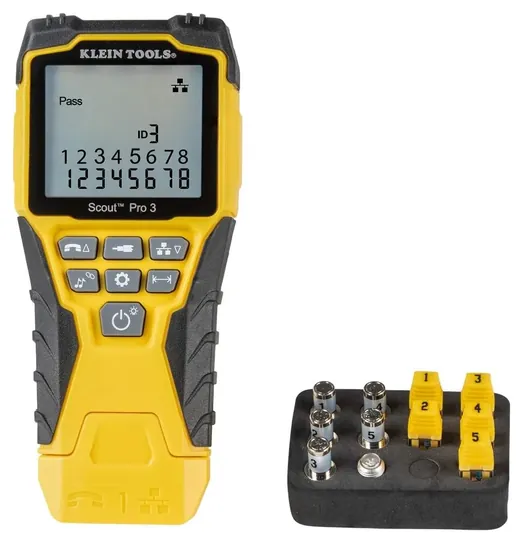
- The numbered LanMap and CoaxMap room remotes only identify locations; for a wire map, use the self-storing Test + Map remote. pp. 2, 9
- Length is read from capacitance, so set the cable's pF-per-foot constant, ideally worked out on a known sample of at least 50 feet. p. 4
- Connect one RJ cable at a time, since the jacks share internal wiring; a coax cable can stay plugged in alongside. p. 2
- Never run Hub Blink on a powered PoE port, and keep the tester off energized cable. pp. 2-3
Why the Klein Scout Pro 3 is our top pick
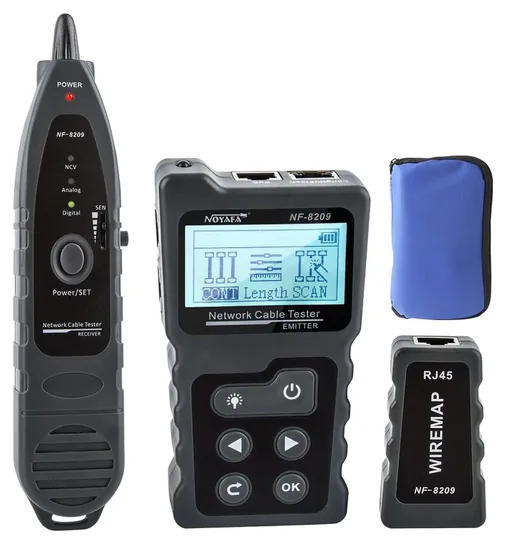
The Scout Pro 3 covers more of a house's wiring and catches the fault that matters most: one handheld checks data, phone and coax cables,1 and its wire map flags split pairs, which pass a light-up test and still slow a link.1 Our runner-up, the Noyafa NF-8209, takes only Ethernet plugs,3 and its manual's wire-map faults name opens, shorts and crossed wires, with no mention of split pairs.3 An independent bench check found the same gap.4
The kit also maps rooms. It ships with five numbered data remotes and five coax remotes,2 and extra remotes raise the count to 19 locations.1 Those numbered remotes only identify a room, though; a wire map needs a Test + Map remote, and the kit's only one is the self-storing remote on the tester.1,2 Length comes from capacitance, so set the cable's constant, ideally from a known sample of 50 feet or more.1
The NF-8209 is the better buy for powered networks. It reads PoE voltage from 5 to 60 volts,3 blinks a switch port and reports its speed,3 and includes its tracing probe.3 Our pick is for unpowered cable only and needs a separate probe to trace.1
| Klein Scout Pro 3 | Noyafa NF-8209 | |
|---|---|---|
| Cables it tests | Data, phone and coax | Ethernet only |
| Split pairs in the wire map | Flagged | Not listed |
| Room-mapping remotes | 5 data and 5 coax | None; one wiremap remote |
| Length range | Up to 1,999 ft | 2.5 to 200 m |
| Powered ports | Unpowered cable only | Reads PoE, 5 to 60 V |
Sources
- Klein Scout Pro 3 1VDV501-851 instruction manual (PDF), pp. 1, 2, 2, 9, 2, 7, 4 2Kit page with remotes
- Noyafa NF-8209 3Instruction manual V2 (ManualsLib), pp. 3, 7–8, 9, 10
- 4epanorama.net: Cable tester NF-8209 tested
From the manual
- Length mode needs the far end unplugged, with no remote attached, on a run of 2.5 to 200 meters; otherwise it reads zero. p. 5
- Any short masks other faults: the wire map then shows only "Short," even if wires are also crossed or broken. p. 3
- The tester's and remote's wiremap ports are protected only to 48 volts DC; PoE readings go through the separate PoE jack. pp. 6, 9
- Set the receiver to the sender's tracing mode, or it stays silent even on the right cable. p. 5
Compare the specs
Swipe the table sideways to see every column.
| Product | Connects to | Split pairs (in the wire map) | Length readout (ft, max) | PoE | Tone tracing |
|---|---|---|---|---|---|
| 1. Klein Scout Pro 3 | RJ45, RJ11/12, coax | Yes | 1,999 | No, dark cable only | Yes, probe extra |
| 2. Noyafa NF-8209 | RJ45 | Not listed | 656 | Reads 5-60 V | Yes, probe included |
| 3. Klein LAN Scout Jr. 2 | RJ45 | Yes | No | No, dark cable only | Yes, probe extra |
| 4. Klein LAN Explorer | RJ45, RJ11/12 | Not listed | No | No, dark cable only | No |
| 5. Fluke Networks MicroScanner2 | RJ45, RJ11, coax | Yes | 1,500 | Detects 802.3af | Yes, probe extra |
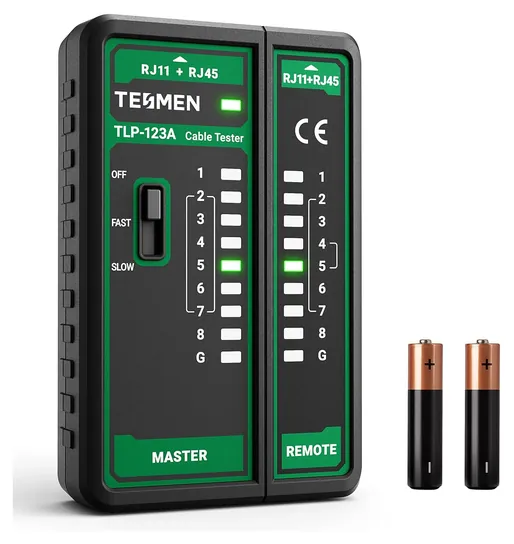
| 6. Tesmen TLP-123A | RJ45, RJ11 | Not listed | — | — | — |
| 7. Klein Tone & Probe PRO | Clips, RJ11 plug | n/a (toner) | n/a | No, dead wires only | Yes, kit |
| 8. Fluke Networks Pro3000 | Clips, RJ11 plug | n/a (toner) | n/a | — | Yes, kit |
| 9. NetAlly LinkSprinter 300 | RJ45 | — | 656 | Reads af/at voltage | No; blinks switch port |
Makers' figures. Noyafa gives its 200-meter limit in meters (656 ft). "Not listed" means the maker's fault list leaves split pairs out; a dash means the maker doesn't say.
Sources
- Klein Tools Scout Pro 3 VDV501-851 manual (PDF) LAN Scout Jr. 2 VDV526-200 manual (PDF) LAN Explorer VDV526-100 instructions (PDF) LAN Explorer product page Toner-Pro / Probe-Pro kit manual, EU edition (PDF)
- Noyafa NF-8209 instruction manual V2 (ManualsLib)
- Fluke Networks MicroScanner2 MS2-100 specifications Pro3000 users guide (PDF)
- Tesmen TLP-123A product page
- NetAlly LinkSprinter product page LinkSprinter datasheet (PDF)
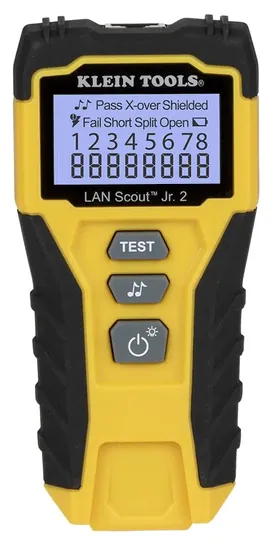
From the manual
- Pull out the plastic tab on the back before first use. p. 1
- Loop mode, a fresh test every two seconds, is on by default to catch intermittent faults; a long press on Test turns it off. p. 5
- It checks for voltage before every test and won't run if it finds any; disconnect it right away. p. 4
- Laying the pairs in pin order 1-2, 3-4, 5-6, 7-8 is a classic home-built error: continuity passes, but the pairs are split. p. 7
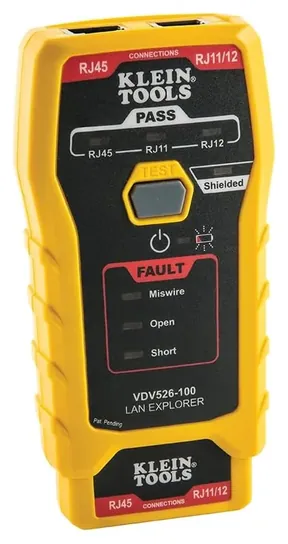
From the manual
- One press runs a test and holds the result for 30 seconds before it powers off; hold the button two seconds to switch off. p. 1
- An open or a short hides a miswire: the lights report only the open or the short. p. 1
- A crossover cable flashes the Miswire and Pass lights together instead of failing. p. 1
- Check plugs first: badly crimped plugs damage its jacks, and it is rated for indoor use only. p. 1
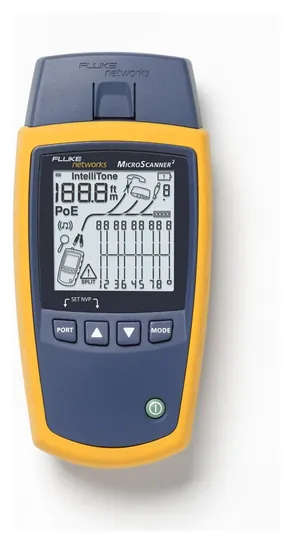
From the manual
- PoE mode sees only 802.3af power, so Cisco's older inline power and other non-standard schemes go undetected. p. 37
- Keep it off active phone lines and ISDN gear: their voltage can damage it. It shows a warning symbol on high voltage. p. 3
- Length accuracy depends on NVP; set it for your cable, or let the tester work it out from a known length. p. 58
- The one-year warranty covers the tester and wiremap adapter, and only for units bought through an authorized Fluke Networks seller. warranty page
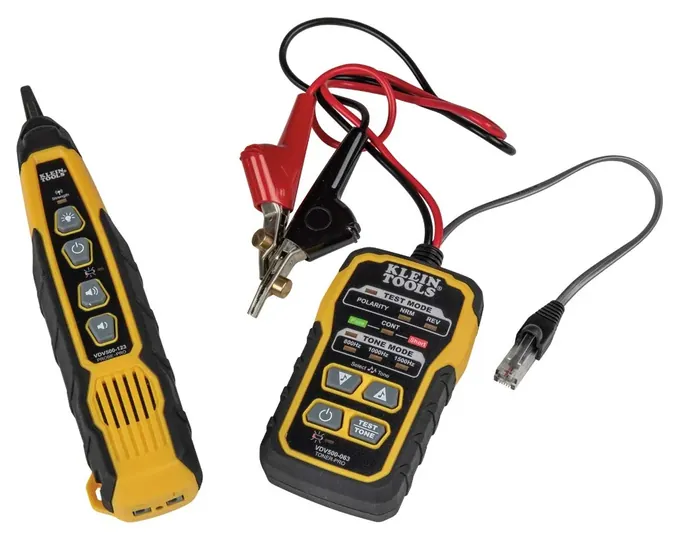
From the manual
- The toner runs a continuity check at power-up; if the clipped wires are shorted, the light turns red and no tone is sent. p. 4
- To pick out a pair, spread the far-end wires about two inches apart and sweep the probe slowly across them. p. 4
- Each unit takes four AAA cells; the probe shuts off after 10 idle minutes, the toner after 60. pp. 2-3
- The probe tip twists out with a quarter turn and can be replaced if it breaks. p. 7
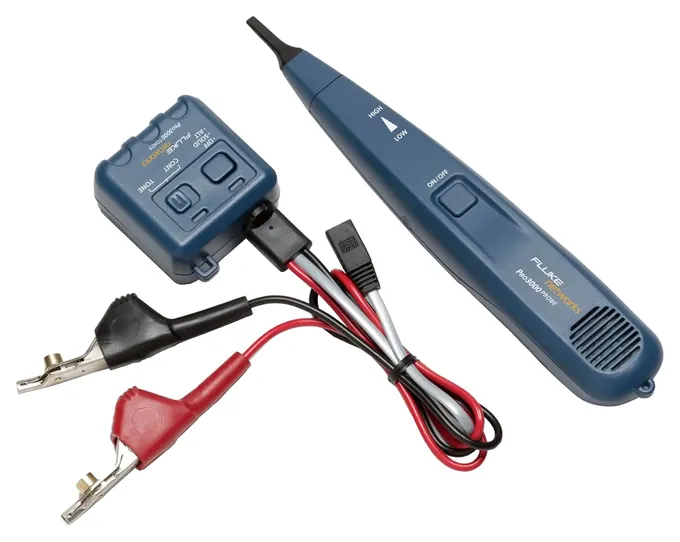
From the manual
- This kit's probe has no hum filter; the F50 and F60 probes add one for work near AC wiring. p. 2
- Batteries aren't included: each unit takes a 9-volt alkaline, and a weak toner battery lowers its output. pp. 2-3
- SmartTone confirms a pair: short and open it at the far end and the tone changes. It works on dry, unterminated pairs only. p. 3
- Fluke Networks warrants the toner and probe for 18 months; accessories get 90 days. p. 5
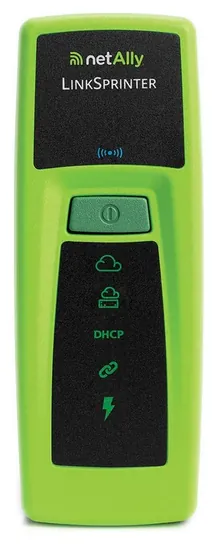
From the manual
- On a PoE port it runs without batteries; anywhere else it needs two AA cells. p. 1
- Tap power to start and tap again to open its Wi-Fi hotspot, then browse to 172.16.9.9 on your phone for details. p. 1
- Its cable test won't run on a cable plugged into a switch, and length is accurate to about 100 meters. NetAlly knowledge base
- Take the AA cells out for storage; NetAlly's warranty excludes battery-leak damage. p. 2
Editor's Notes
November 19, 2026, by Ezvid Wiki Editors:
We read the makers' manuals and guides for eight of the nine picks and added a spec table, a section on why the Scout Pro 3 leads, and notes from the manuals. We corrected the NetAlly LinkSprinter 300's entry, which said it can't check a cable's wiring, and dropped the line that the Klein toner kit can't trace through drywall, which Klein's own answers contradict. The buyer's guide now says the Scout Pro 3 measures length by capacitance, not by timing a pulse.
November 16, 2026, by Ezvid Wiki Editors:
Only the filtered Pro3000F50 kit is marked discontinued, not the Fluke Networks Pro3000 on this list, and Klein still lists the Scout Pro 3 and the LAN Scout Jr. 2 as current. Of the newer testers we weighed, the FNIRSI LPM-10A has a short track record and doubts about its length readings, and the NOYAFA NF-8209S is close to a copy of the Noyafa NF-8209 already here. No recall surfaced for these picks, so the list stands.
October 19, 2026, by Ezvid Wiki Editors:
The Klein Scout Pro 3 is our new top pick. It checks data, phone and coax cables, catches split pairs and comes with numbered remotes for mapping wall jacks, which covers most home and small-office installs at a fair price. The old list leaned on pro gear that cost hundreds or thousands, so we rebuilt it around the testers people really reach for, from the Klein LAN Explorer to the Noyafa NF-8209 kit. The Fluke Networks MicroScanner2 and NetAlly LinkSprinter 300 stay for IT work.
Several older picks are gone. Fluke has retired the CableIQ, the Tripp Lite tester belongs on a fiber page, the Trendnet TC-NT3 is out of stock, and the Noyafa NF-8209 replaces the thinly documented Noyafa AT278. We also dropped three generic testers we couldn't confirm are still sold, plus the T3 Net Prowler. Two toners join the list, because finding the right cable is half of most jobs.
For evidence we leaned on Klein's and Fluke's manuals and spec sheets, Fluke Networks' guide to verification versus certification, and one independent bench check of the Noyafa. Certification testers that cost thousands sit in the honors below.
Earlier notes
November 16, 2020, by Kaivaan Kermani:
My primary consideration during this update was to reorder the list to reflect a more ‘equitable’ product mix, since we had many sophisticated qualification testers on this list in here with the ranks of cheap and basic verification testers that do nothing more than indicate the presence of an performance or connectivity problem. Granted, high end options are a lot more comprehensive, but arguably they’re less in demand, as they're only used by professionals to check large networks. Hence, I’ve removed options like the NetScout 2000 LinkRunner and Fluke Microscanner 2, though I have left in the Fluke CableIQ. [2026 update: the Fluke MicroScanner2 is back on the list, and Fluke has since retired the CableIQ.]
High-End Qualification Testers
I’ve added special honors for new high-end qualification testers from both NetAlly – formerly known as NetScout – and Fluke, and, of course it goes without saying that both are leading companies in the development of comprehensive network testers. Resultantly, these are some of the most sophisticated, user-friendly and up-to-date models that money can buy, especially the NetAlly LinkRunner 10G.
Support for The Multi-Gig Network Generation
The Microscanner 2 we had was actually a kit, which included the SimpliFiber Pro optical power meter and other accessories, and not the basic model on its own, which is a little cheaper. I could have easily just included the standalone model here as an option in our more ‘reasonable product mix’ though, the Microscanner 2 is a little dated now, and isn’t built for the next generation of network infrastructure – multi-gig ethernet, including 2.5G and 5G, and all the way up to 10G.
Multi-gig networks using copper-based infrastructure would require at least Cat 6 cabling, which brings up another major consideration of mine during this update, which was to ensure that models could support these high speeds. With the exception of the Tripp Lite Fiber and D Yedemec Fault Locator, which have been featured primarily because of their support for optical fiber cables, all of these models should support at least Cat 6 and Cat 6a cabling.
September 6, 2019, by Daniel Imperiale:
Among IT professionals, Fluke is generally considered to be the gold standard for diagnostics, so it's no surprise that they have a pair of models in our top three, including the model in our number one slot. [2026 update: this describes the 2019 list. Today's top pick is the Klein Scout Pro 3, a copper-only tester, and Fluke's picks sit further down.] A quick look at what it has to offer sets the tone for the rest of our list, with its ability to diagnose problems on both copper and fiber lines. It has a big, informative display, though some modern technicians may prefer a full color screen like the ones offered by Net Ally and T3. Often, the menus on these systems will be a little easier to navigate, potentially making them better choices for IT managers trying to train new employees, but the prices of these two in particular prevent them from being viable for homeowners setting up small networks, or for students learning the trade.
Availability concerns caused us to remove the TopOne model from our previous ranking, but we found a viable option that offers both user-friendliness and, surprisingly for its price point, a color screen. Beyond these considerations, we gave priority to testers that could offer techs a location on any given fault, to make their jobs that much easier.
Special Honors
NetAlly LinkRunner 10G A full Ethernet field tester for IT teams that support Multi-Gig and 10-gigabit networks. It runs cable and wire-map tests, toning and PoE load tests up to 90 watts, then checks the network itself, and it can watch a link for intermittent faults for up to a day. Reseller prices run into the thousands. netally.com
Fluke Networks DSX2 CableAnalyzer The certifier many cable makers expect to see reports from before they'll back a structured-cabling warranty. The DSX2 units measure crosstalk, return loss and insertion loss against the TIA and ISO standards for Cat6A and beyond, and turn the results into pass or fail reports. It's a contractor's tool priced in the thousands, well past what a home network needs. flukenetworks.com
Verify, Qualify Or Certify
So a pass on a verifier means the wiring is right, not that the cable will run 10-gigabit.
Fluke Networks sorts cable testers into three tiers (Fluke Networks). A verifier, which is what most people buy, checks the wire map: every one of the eight wires lands on the matching pin at the far end, with no open, short, miswire or split pair. A qualifier goes further and tells you whether the link can carry a given speed, such as gigabit. A certifier measures crosstalk and signal loss against the TIA and ISO cabling standards and produces a report, and cable makers usually demand those reports before they'll honor a system warranty.
So a pass on a verifier means the wiring is right, not that the cable will run 10-gigabit. It also can't read the category printed on the jacket: a Cat5e and a Cat6 run look the same to it.
Split pairs deserve special mention. If the wires are landed pin to pin but the twisted pairs are broken up, a simple continuity test passes while the link drops packets or falls back to a slower speed. Testers with a screen that shows the map by pair, such as the Klein LAN Scout Jr. 2, flag this. Basic light-up testers usually don't.
Ports, Length And PoE
Match the tester to the jacks you work on. Many handle only Ethernet plugs. Others add phone plugs and coax F connectors, which matter in older homes with mixed wiring. Numbered far-end remotes let one person test several wall jacks and see which room each one lands in.
Length readings are estimates. Most testers time a pulse down the cable and need its speed factor, called NVP, set correctly; Fluke lets you enter the MicroScanner2's or work it out from a cable of known length (Fluke Networks). The Klein Scout Pro 3 measures capacitance instead, so it needs the cable's length constant, which Klein suggests setting from a sample at least 50 feet long (Klein Tools). An independent check of the Noyafa NF-8209 read 101.6 meters on a 100-meter Cat5e cable (epanorama.net), and Noyafa's manual limits its length mode to runs of 2.5 to 200 meters with nothing connected at the far end (ManualsLib).
Power over Ethernet (PoE) is where testers break. Klein's manual for the LAN Explorer gives 66 volts DC between pins as the most it can take without damage, and says indoor use only (Klein Tools). PoE switches put out roughly 44 to 57 volts (Electronic Design), and Fluke warns that active phone lines can damage its MicroScanner too (Fluke Networks), so unplug cables from switches and phone gear before you test unless the tester is rated for live ports. Some models only detect older PoE: Fluke notes that the MicroScanner2 recognizes 802.3af power (Fluke Networks).
Finding A Cable With A Toner
A toner is not a tester. It answers a different question: which of these 48 cables in the closet goes to the bedroom? You clip the tone generator to the cable at one end, then run the probe along a bundle or patch panel until it hums loudest.
Analog toners like the Fluke Networks Pro3000 carry a tone a long way and are simple to use, but they only work on cable that isn't connected to live gear. Klein limits its toners to non-energized wiring under 60 volts. Digital toners use a higher frequency that can be traced on an active network and ignore electrical hum, at a higher price.
Near power wiring, an unfiltered analog probe picks up a 60-hertz buzz. Fluke sells filtered versions of the Pro3000 probe for that reason. Several testers, including the Klein Scout Pro 3 and LAN Scout Jr. 2, can send tone but need a separate probe to hear it.
How we researched this
We compared 17 network cable testers, toners and port checkers, and for eight of the nine picks we read the makers' own documents: Klein's manuals for the Scout Pro 3, LAN Scout Jr. 2, LAN Explorer and Toner-Pro/Probe-Pro kit, Fluke Networks' MicroScanner Series manual and Pro3000 users guide, Noyafa's NF-8209 manual, and NetAlly's LinkSprinter datasheet and quick guide; the Tesmen has only its maker's product page. Fluke Networks' articles on verification, qualification and certification shaped the buyer's guide, and epanorama.net's bench check of the NF-8209 is the one independent length test we cite. Searches of CPSC and Health Canada recalls found Klein recalls of voltage testers, clamp meters and power stations and older Fluke meter and electrical-tester recalls, but none for these testers, toners or port checkers. The 3D models are built from published dimensions.
Sources (15)
- Fluke Networks: Verification, qualification and certification
- Fluke Networks: Certification vs. qualification
- Klein Tools: Scout Pro 3 VDV501-851 manual
- Klein Tools: LAN Explorer VDV526-100 manual
- Klein Tools: LAN Scout Jr. 2 product page
- Noyafa NF-8209 manual (ManualsLib)
- epanorama.net: Cable tester NF-8209 tested
- Fluke Networks: MicroScanner2 MS2-100 specifications
- Fluke Networks: Detecting PoE with the MicroScanner2
- Fluke Networks: MicroScanner Series users manual
- Fluke: Pro3000 tone and probe kit
- NetAlly: LinkSprinter cable test option
- Electronic Design: PoE output voltage, 802.3af and 802.3at
- U.S. Consumer Product Safety Commission: Recalls
- Health Canada: Recalls and safety alerts
Frequently asked questions
Can a cable tester tell Cat5e from Cat6?
No. A wire-map tester checks that each wire reaches the right pin. The category is printed on the cable jacket, and only a certifier can show whether a run performs to a category's limits.
If my tester says pass, will the cable run gigabit?
Not necessarily. A pass means the wiring is correct. Gigabit and faster links also depend on crosstalk, termination quality and length, which only a qualifier or certifier measures.
Why does my cable pass but the connection is slow?
The usual causes are split pairs, poorly terminated plugs, a run longer than 100 meters or a damaged jacket. A tester with a pair-by-pair map catches split pairs; the rest may need a qualifier.
Can I plug a cable tester into a PoE switch?
Not a basic one. PoE runs at roughly 44 to 57 volts, and many testers are rated only for unpowered cables. Use a model made for live ports, or unplug the cable from the switch first.
What is a tone and probe kit for?
Finding one cable among many. The generator puts a tone on the cable at one end, and the probe beeps when you touch or pass near the same cable at the other end. Use an analog kit only on unpowered wiring.
Do I need cable certification?
Only when a cable maker's warranty or a building contract calls for it. Certification needs a certifier and produces a report for each link. For home and small-office work, a good verifier is enough.